ONE PHOTO. TWO DIFFERENT MOODS.
Skull Cap Trend AI Video Generator
Your photo. The cap. The cold stare.
Turn one photo into the Skull Cap glow-up: a goofy bright-room opening, a quick camera whip, then you in a black cap and hoodie with a serious stare.
From $6.90 for the complete video · or 6–14 credits · ready in about 5–12 minutes · no app, no subscription
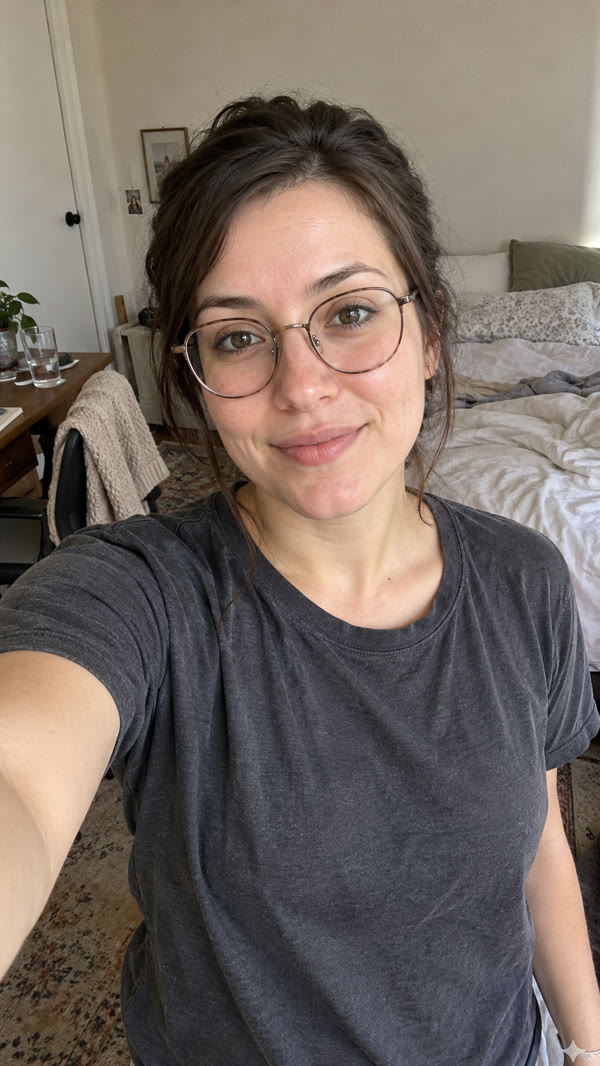
1Add your photo
Your portrait
2Pick quality
Resolution
- 11 seconds
- 9:16 vertical
- 480p MP4
- Trend sound
- No watermark
This complete video: $6.90 or 6 credits
By creating, you confirm you're 18+ and have permission to use this photo, with no public figures. Terms of Service
The short answer
Make the Skull Cap trend from one photo
Make the Skull Cap trend from one clear adult portrait. MemeReel creates a playful bright-room opening, then a dark reveal in a black skull cap and hoodie. Choose 480p for $6.90 or 6 credits, 720p for $9.90 or 9 credits, or 1080p for $14.90 or 14 credits. Each option includes both scenes in one approximately 11-second vertical MP4 with sound. No filming, outfit or prompt is needed. Sign in to create, then download the result. Allow about 5–12 minutes; timing and likeness can vary.
Skull Cap before and after: photo to video
Compare the input portrait with the complete AI result, including both sides of the transition. This is an actual MemeReel 480p example made from a fictional adult portrait.
One photo, two moods
The same portrait supplies the person in both scenes. The opening keeps the everyday look; the dark reveal adds the black skull cap and hoodie. Glasses remain in both scenes in this example. Actual 480p result from a fictional adult portrait.How to make a Skull Cap AI video
- 1
Upload one clear portrait
Choose a well-lit photo of one adult with the face clearly visible. Leave room around the head and shoulders. Everyday clothes are fine; you do not need to wear a skull cap or hoodie.
- 2
Generate your before-and-after transformation
Both scenes use the same photo. Choose 480p ($6.90 or 6 credits), 720p ($9.90 or 9 credits) or 1080p ($14.90 or 14 credits). After payment, review your photo and click Generate video.
- 3
Download your video
Save the approximately 11-second vertical MP4 with sound. Share it on TikTok, Instagram Reels or YouTube Shorts, or add your own caption before posting.
What is the Skull Cap trend?
One portrait, two moods and a black-cap reveal.
Updated
The Skull Cap trend, also written as the skullcap trend, is a TikTok before-and-after meme about an exaggerated change in confidence. A person starts with an awkward or playful look, then switches to a black cap, a hood and an intense expression. The joke is how much attitude a simple cap seems to unlock.
You may recognize captions about how people act seconds after putting on a skull cap. This template recreates the bright-to-dark mood switch from one photo. The transition uses a quick camera whip: you appear in the second scene already wearing the cap and hoodie.
What it means
The joke is how much attitude a simple cap seems to unlock. Your AI version recreates the contrast with your own likeness.
What is the Skull Cap trend song?
Many versions of the meme use Bryson Tiller's verse from DJ Khaled's “Wild Thoughts,” featuring Rihanna and Bryson Tiller. On TikTok, the audio is often labeled “original sound – SoulReligion”; other versions use different sounds. Our example includes the sound from its reference clip.
Looking for a Skull Cap filter or CapCut template?
MemeReel creates the Skull Cap transformation from a still photo in your browser. You do not need a live camera filter, a CapCut template link or a recording of yourself doing the transition. The black cap and hoodie are built into this fixed video template.
The Skull Cap glow-up, scene by scene
The complete template has two scenes and one quick bright-to-dark transition.
| Stage | What you see |
|---|---|
| Bright opening · 0–5 seconds | Your everyday look, playful expression and head-and-hand movements. |
| The switch · around 5 seconds | A quick camera whip toward the ceiling joins the two scenes. |
| Dark reveal · 5–11 seconds | A black skull cap under a raised hood, a hand gesture, side turn and serious stare. |
Skull Cap Trend AI tools, compared
One photo, the complete transformation
The opening and reveal are included in one purchase. You do not need to film the transition or find an outfit.
See the real result first
The example is an actual 480p output made from a fictional adult portrait, with the input photo shown alongside it.
Pay for this video
Choose 480p for $6.90, 720p for $9.90 or 1080p for $14.90. Use 6, 9 or 14 credits instead if you prefer. Both scenes are included, with no subscription.
Skull Cap AI questions
Can I make the Skull Cap trend with just a photo?
Yes. Upload one clear adult portrait. The template creates both the opening and the reveal, so you do not need to record a before-and-after video.
Can women make a Skull Cap trend AI video?
Yes. The template follows the person in your photo. The example on this page was made from a fictional woman's portrait; it does not require a male character.
Do I need to wear a skull cap or hoodie in my photo?
No. Use an everyday portrait with your face visible. The reveal adds the fixed black cap and hoodie, while the opening uses your everyday appearance.
Will it keep my glasses?
The template is designed to keep the glasses shown in your photo in both scenes. The actual example shows this behavior. Choose a clear photo with your eyes visible through the lenses; if your photo has no glasses, the template does not ask to add them.
Is this a Skull Cap face swap or a live filter?
It is a photo-based AI video remake. Your photo supplies the likeness for the reference performance, including the bright opening and dark reveal. You do not need a live filter or to perform the gestures yourself.
Is the Skull Cap AI generator free?
One complete video costs $6.90 at 480p, $9.90 at 720p or $14.90 at 1080p. You can instead use 6, 9 or 14 credits respectively. The price updates when you choose a resolution. Credit packs are optional; there is no subscription.
What if my video fails?
If a generation fails, the credits used for your selected resolution return automatically. A single-video purchase becomes available to retry without paying again. If it still cannot be delivered, contact support@memereel.net with your order reference for help or a refund.
How long is the Skull Cap video?
The finished template is about 11 seconds long and downloads as a vertical MP4 with sound. The example shown here was generated at 480p.
Can I change the hat, hoodie or background?
This is a fixed Skull Cap video template. The opening follows your photo's everyday appearance; the reveal uses a black skull cap and hoodie in the template's dark room.
Can I use a pet photo?
This version is for one adult person. The example and confirmed workflow use an adult portrait; a pet version is not offered on this page.
What kind of photo works best?
Use one person with a clear, well-lit face and some head-and-shoulder space. Avoid sunglasses, heavy blur and anything that hides the eyes or face.
More AI meme video templates
Thriller Dance AI Generator for Halloween
Turn your photo into a Halloween sheriff costume and lead a Thriller zombie dance. No costume, filming or dance practice needed.
Tiny Desk AI Video
You sing lead and laugh up close, a friend takes the sax if you like, with the original Outstanding song.
Can Can Dance AI
Solo or trio, at home, on a Paris street or on a cabaret stage, dancing the viral TikTok moves.
Make your own Skull Cap trend video
Turn one photo into the Skull Cap glow-up: a goofy bright-room opening, a quick camera whip, then you in a black cap and hoodie with a serious stare.
Customize my video